Choosing a web hosting provider is one of the first important decisions you make when starting a website.
Your hosting company stores your website files, keeps your pages available online, helps protect your data, and affects how quickly your website loads.
A poor hosting service can lead to slow performance, downtime, security problems, and difficulty managing your website.
Bluehost is one of the most recognized web hosting brands in the market.
It is commonly used by bloggers, small business owners, WordPress users, ecommerce businesses, developers, and agencies.
The company offers shared hosting, WordPress hosting, WooCommerce hosting, VPS hosting, cloud hosting, dedicated servers, domains, website migration, security tools, and AI website creation features.
Bluehost also includes NVMe storage, a free domain for the first year, free CDN, managed WordPress updates, website backups, and customer support on its main hosting plans.
But is Bluehost still worth using?
In this Bluehost review, we will examine its features, latest pricing, advantages, disadvantages, and overall value to help you decide whether it is the right hosting provider for your website.
What Is Bluehost?
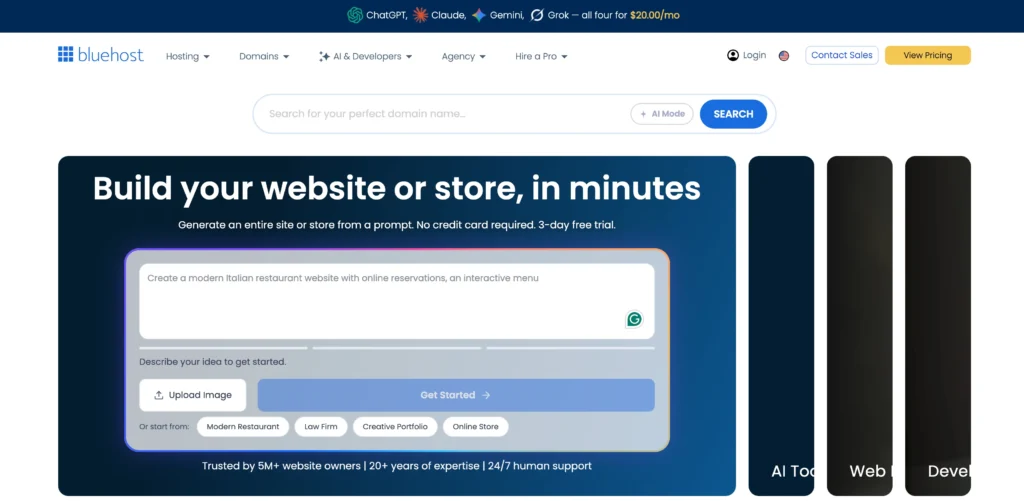
Bluehost is a web hosting company that helps individuals and businesses create, host, and manage websites.
The platform is especially popular among WordPress users because it offers easy installation, managed updates, staging tools, caching, security features, and developer access.
Bluehost can be used for:
• Personal blogs
• Small business websites
• Portfolio websites
• Affiliate websites
• Ecommerce stores
• Membership platforms
• Online courses
• Agency websites
• High-traffic WordPress projects
The company provides hosting options for both beginners and experienced users.
Business owners can choose from Starter, Business, and eCommerce Essentials plans, while developers can use VPS, WordPress Cloud, dedicated hosting, or custom enterprise solutions.
Bluehost also provides a 30-day money-back guarantee on eligible plans.
Key Features of Bluehost
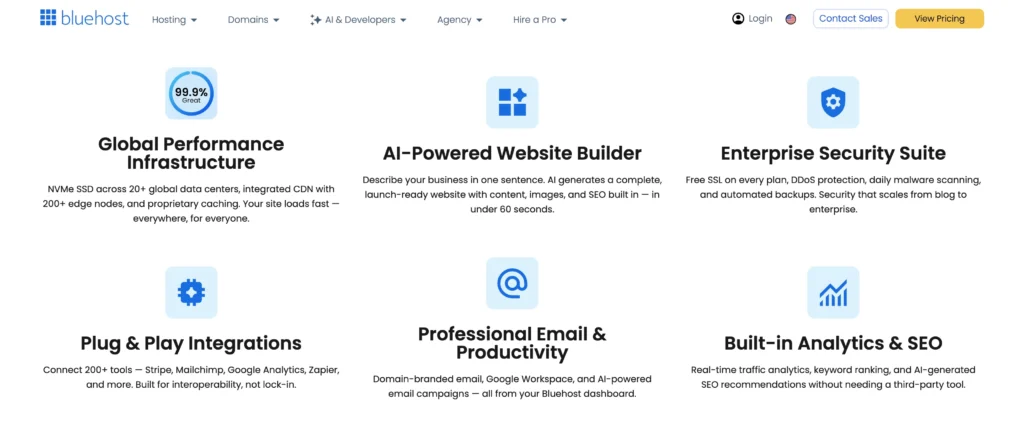
Bluehost includes several features that help users create, protect, and manage websites.
Below are the main features available with its hosting plans.
1. AI Website Creation Tools
Bluehost includes AI website creation tools with its main hosting plans.
These tools help users create the basic layout of a website without starting from a blank page.
You can provide information about your website, business, or preferred design, and the AI tools can suggest pages, layouts, and content sections.
This can be helpful for beginners, small business owners, bloggers, freelancers, and local service providers.
The AI tools can save time, but users should still review the text, images, and page design before publishing the website.
2. WordPress Hosting and Management
Bluehost is widely known for WordPress hosting.
Its plans include managed WordPress updates, caching, staging, developer tools, and easy website setup.
WordPress users receive access to:
• Managed WordPress updates
• WordPress staging site
• Static content caching
• Object caching
• Free SSL certificate
• Free CDN
• SSH access
• WP-CLI
• Yoast SEO plugin
The staging feature allows users to test changes on a copy of their website before applying them to the live version.
This is useful when installing plugins, changing themes, editing designs, or updating website code.
3. NVMe SSD Storage
Bluehost uses NVMe SSD storage on its main business hosting plans.
NVMe storage provides faster data access than older storage systems and can help websites load files, images, and databases more quickly.
The Starter plan includes 10 GB of NVMe SSD storage.
The Business plan includes 50 GB.
The eCommerce Essentials plan includes 100 GB.
These limits should be enough for many small and medium-sized websites, although websites with large media libraries may require more storage.
4. Free Domain for the First Year
Bluehost includes a free domain for the first year with eligible hosting plans.
A domain is the web address visitors use to open your website, such as yourbusiness.com.
This offer reduces the initial cost of starting a website.
However, the domain is only free for the first year, so users should check the renewal cost before the registration period ends.
5. Free CDN
Bluehost includes a free content delivery network with its main plans.
A CDN stores copies of website content across multiple locations.
When someone visits your site, the content may be delivered from a server closer to that visitor.
This can help improve page-loading speed for users in different countries and may reduce pressure on the main hosting server.
6. Free Website Migration Tool
Bluehost provides a free site migration tool for users moving from another hosting provider.
Website migration may involve transferring files, databases, WordPress installations, images, themes, plugins, and settings.
This process can be difficult for beginners, so the migration tool helps make the transfer easier.
Users should still create a complete backup before moving their website.
7. Website Security Tools
Bluehost includes several security features depending on the selected plan.
The Starter plan includes free SSL, malware scanning, malware detection and removal, and weekly backups.
The Business and eCommerce Essentials plans provide stronger protection, including:
• AI-powered malware detection and removal
• Web application firewall
• DDoS protection
• Free domain privacy for the first year
• Weekly website backups
These tools help protect websites from malware, suspicious traffic, and common online threats.
8. Website Backups
Bluehost includes weekly website backups with its main business plans.
Backups help users restore a website after an error, failed update, hacking attempt, or accidental file deletion.
Weekly backups may be enough for small websites that are not updated often.
However, busy ecommerce stores, membership websites, and news websites may prefer daily or real-time backups.
For important websites, it is safer to maintain an additional independent backup.
9. Performance and Caching Tools
Bluehost includes several tools designed to improve website performance.
These include static content caching, object caching, NVMe storage, free CDN, managed WordPress updates, and global data centres.
Static caching stores copies of website pages so they can be delivered more quickly.
Object caching helps WordPress retrieve database information faster.
Actual speed will also depend on your theme, plugins, images, page design, and website traffic.
10. Customer Support
Bluehost provides 24/7 chat support with its main hosting plans.
Phone support is not included with the Starter plan.
The Business and eCommerce Essentials plans include both chat and phone support.
The support team can help with WordPress setup, domains, SSL, email configuration, hosting issues, migration, and account management.
Phone support may be useful for business owners who prefer speaking directly with a support representative.
11. SEO and Marketing Tools
Bluehost includes the free version of the Yoast SEO plugin with its business hosting plans.
Yoast SEO helps WordPress users manage basic on-page SEO settings.
It can assist with:
• SEO titles
• Meta descriptions
• XML sitemaps
• Readability checks
• Search engine indexing settings
Bluehost also includes a free trial of professional email services.
The WordPress Cloud plan includes Yoast SEO Premium.
12. Ecommerce Tools
The eCommerce Essentials plan includes tools designed for online stores and digital businesses.
It includes WooCommerce auto-installation, secure payment processing, product subscriptions, memberships, paid course tools, affiliate program features, custom email templates, and social login options.
These tools can be useful for businesses selling physical products, digital products, subscriptions, memberships, and online courses.
Bluehost Pricing Plans
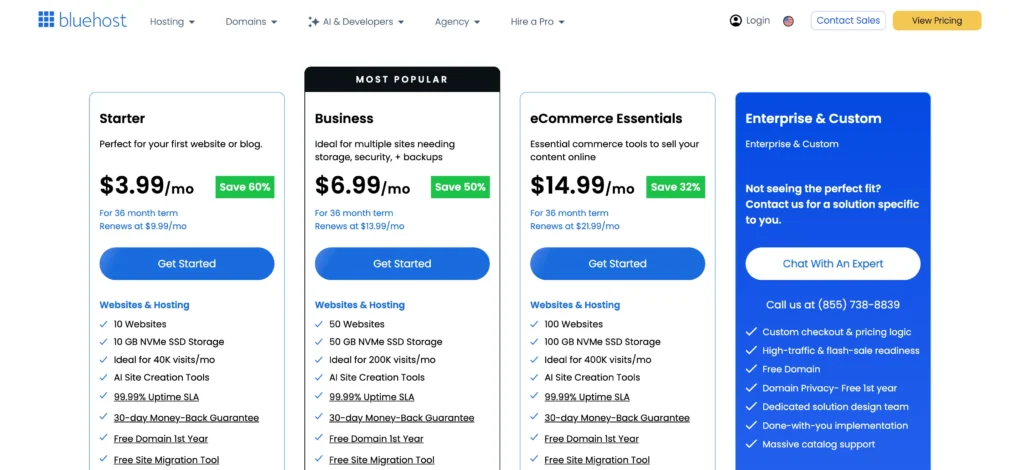
Bluehost offers hosting plans for beginners, business owners, ecommerce websites, developers, agencies, and enterprise customers.
The lowest prices generally require a long-term subscription.
Bluehost Starter Plan
The Starter plan costs $3.99 per month with a 36-month subscription.
It renews at $9.99 per month.
The plan includes:
• Up to 10 websites
• 10 GB NVMe SSD storage
• Suitable for around 40,000 monthly visits
• AI website creation tools
• 99.99% uptime SLA
• Free domain for the first year
• Free site migration tool
• Free CDN
• Managed WordPress updates
• Global data centres
• 24/7 chat support
• Free SSL
• Malware scanning and removal
• Weekly website backups
• Yoast SEO plugin
• Static and object caching
• SSH and WP-CLI
• WordPress staging
Phone support is not included.
This plan is suitable for beginners, bloggers, portfolios, and small business websites.
Bluehost Business Plan
The Business plan costs $6.99 per month with a 36-month subscription.
It renews at $13.99 per month.
The plan includes:
• Up to 50 websites
• 50 GB NVMe SSD storage
• Suitable for around 200,000 monthly visits
• AI website creation tools
• 99.99% uptime SLA
• Free domain for the first year
• Free website migration
• Free CDN
• Managed WordPress updates
• Phone and chat support
• Free SSL
• AI-powered malware detection and removal
• Web application firewall
• DDoS protection
• Free domain privacy for the first year
• Weekly backups
• Yoast SEO
• Static and object caching
• WordPress staging
• SSH and WP-CLI
This is the most balanced plan for users managing several websites or business projects.
Bluehost eCommerce Essentials Plan
The eCommerce Essentials plan costs $14.99 per month with a 36-month subscription.
It renews at $21.99 per month.
The plan includes:
• Up to 100 websites
• 100 GB NVMe SSD storage
• Suitable for around 400,000 monthly visits
• AI website creation tools
• 99.99% uptime SLA
• Free domain for the first year
• Free CDN
• Free migration tool
• Managed WordPress updates
• Phone and chat support
• WooCommerce auto-installation
• Secure payment processing
• Product subscriptions
• Membership tools
• Paid course features
• Affiliate program tools
• Custom email templates
• Social login options
• Advanced malware protection
• Web application firewall
• DDoS protection
• Weekly backups
• WordPress staging
This plan is best for online stores, course creators, membership websites, and businesses selling subscriptions.
Bluehost Hosting Options for Developers
Bluehost also offers advanced hosting products for developers and larger websites.
Bluehost VPS Hosting
Bluehost VPS Hosting starts at $4.69 per month with a 24-month subscription.
It renews at $5.69 per month.
It includes one vCPU core, NVMe storage, DDR RAM, unrestricted bandwidth, and a 99.9% uptime SLA.
VPS hosting gives users more control than standard shared hosting.
Bluehost WordPress Cloud
WordPress Cloud starts at $17.99 per month with a 36-month subscription.
It includes a 100% uptime SLA, staging, scalable vCPU resources, SSD storage, priority support, unrestricted bandwidth, global edge caching, and Yoast SEO Premium.
This plan is intended for high-traffic and performance-focused WordPress websites.
Bluehost Dedicated Hosting
Dedicated hosting starts at $144.19 per month with a 36-month subscription.
It includes eight vCPU cores, NVMe storage, DDR RAM, unrestricted bandwidth, a cPanel licence, three dedicated IP addresses, and free migration.
Dedicated hosting is suitable for large websites requiring isolated resources and greater server control.
Who Should Use Bluehost?
Bluehost may be suitable for:
• First-time website owners
• Bloggers
• WordPress users
• Small businesses
• Agencies
• Developers
• Ecommerce businesses
• Membership websites
• Course creators
• High-traffic websites
The Starter plan is best for small websites.
The Business plan is better for users managing multiple sites or needing stronger security.
The eCommerce Essentials plan is designed for WooCommerce stores and digital selling.
Is Bluehost Legit?

Yes, Bluehost is a legitimate and established web hosting provider.
It offers shared hosting, WordPress hosting, cloud hosting, VPS hosting, dedicated servers, domains, security tools, and ecommerce services.
Bluehost also provides a 30-day money-back guarantee on eligible hosting plans.
However, users should review renewal prices carefully before purchasing.
The introductory prices are lower, but the monthly rate increases after the first subscription term.
Pros and Cons of Bluehost
Pros
• Beginner-friendly website setup
• AI website creation tools
• Free domain for the first year
• Free CDN
• Free migration tool
• Managed WordPress updates
• NVMe SSD storage
• WordPress staging
• Static and object caching
• 99.99% uptime SLA on main plans
• WooCommerce and ecommerce tools
• Free SSL certificate
• Malware scanning and removal
• Phone support on higher plans
• 30-day money-back guarantee
• Hosting options for beginners and developers
Cons
• Lowest prices require a long-term subscription
• Renewal prices are higher
• Starter plan does not include phone support
• Weekly backups may not be enough for active websites
Final Verdict: Is Bluehost Worth It?
Bluehost is a practical web hosting provider for beginners, WordPress users, small businesses, ecommerce stores, developers, and agencies.
Its main strengths include simple WordPress setup, AI website tools, NVMe storage, free CDN, free domain registration for the first year, migration support, caching, staging, and security features.
The Starter plan is suitable for a first blog, portfolio, or small business website.
The Business plan offers the best value for most users because it includes more websites, additional storage, stronger security, phone support, and higher traffic capacity.
The eCommerce Essentials plan is a good option for businesses selling products, memberships, subscriptions, or online courses.
Bluehost also provides VPS, cloud, dedicated, and custom hosting for developers and larger organisations.
The main disadvantages are the higher renewal prices and weekly backups on the standard plans.
Overall, Bluehost is worth considering if you want a WordPress-friendly hosting platform with beginner tools, business features, and several upgrade options as your website grows.